
Deploying 100 sensors in a single day — a step-by-step playbook
A sensor deployment playbook: 100 devices in one day — PoE-powered gateway, NFC activation, 30–180 s auto-discovery, thresholds and alert testing.
Zespół Nextriv5 min read

Deploying sensors from a playbook rather than by improvisation is the difference between one day and three weeks. A hundred wireless measurement points in a single facility sounds like a project with a schedule and a site manager — in practice, with a no-cabling architecture, the bottleneck is not the technology but the organisation: who does what, and in what order. Below is the complete sensor deployment playbook — with a timeline, the arithmetic that shows why it fits into eight hours, and the list of traps that most often wreck the schedule. How the platform itself works, from connecting the gateway to the alert, is described step by step on the how it works page.
Rule number one: paper before hardware
Deployment day is won a week earlier, at a desk. Three things must exist before anyone opens the first box:
- A measurement point sheet. One line per sensor: target name, room/zone, what it measures, planned thresholds. Names follow a consistent convention (e.g.
Hall A / Zone 3 / Temperature), because a hundred devices named "Sensor-47" is chaos nobody will ever clean up afterwards. - Gateway location and power. The gateway needs a network link and power — ideally a single PoE cable from an existing switch. It is the only point of the deployment where the IT department may be needed, so arrange the port and cable beforehand, not mid-deployment.
- Accounts and roles. The Nextriv platform distinguishes administrator, manager and user roles — send the team invitations early, so that on deployment day everyone logs in with their own account rather than "borrowing the shared one for a moment".
The sensor deployment playbook: a one-day timeline
Assumptions: one facility, 100 sensors, a gateway covering the building, a two-person team.
8:00 — gateway. One PoE cable, fifteen minutes of work. The gateway reports in to the platform, its status lands on a dashboard tile. From this moment the gateway itself is supervised too: if it stops checking in for 15 minutes, the platform marks it offline and notifies the administrator.
8:30 — batch activation, at a table. The key trick of the whole playbook: you do not activate sensors on a ladder. All the boxes go onto one table, and activation happens contactlessly — by holding a phone to the device (NFC), without opening enclosures. The platform detects each new device automatically within 30–180 seconds, recognises the model by itself and reads the metadata: battery level, reporting interval. Detection runs in parallel for many devices, so a batch activated in a quarter of an hour shows up in full on the device list a few minutes later. Each reporting sensor immediately gets its name from the sheet — this is the cheapest moment for housekeeping.
10:00 — installation. With the list in hand and the sensors already transmitting, the team heads out into the facility. Mounting means double-sided tape, screws or cable ties — a few minutes per point. Two measurement-quality rules: a sensor is hung at the height of the zone it is meant to measure (workstations, storage shelves, rack intake), and away from air vents, radiators and sunlit surfaces. A photo of each mounting point added to the sheet will save hours of searching six months from now.
13:00 — dashboards and organisation. The sensors are reporting; time to give the data structure: a dashboard with KPI tiles and charts for each zone, a floor plan with sensor markers wherever the facility is sprawling. Fifteen minutes of arranging tiles pays itself back every single day the system is used.
15:00 — thresholds and notifications. Monitoring without alerts is just pretty charts. For each metric the platform accepts four thresholds — warning and critical, lower and upper — and you already have the starting values in the sheet from the preparation week. Then the channels: email, SMS, web push, Microsoft Teams, Discord or an audible in-app alarm; quiet hours overnight wherever a night alert has no addressee; and escalation for critical events — an unacknowledged alarm goes one level up after a set time. The rate limit (a maximum of 3 notifications per 5 minutes per recipient) makes sure the first day of configuration buries nobody.
16:30 — final test. The deployment ends with a forced alarm, not a declaration of success: one sensor warmed in a hand or put into a fridge must travel the full path — an event with a code, a notification on the right channel, an acknowledgement, a return to normal with an automatic recovery message. Plus a device list check: a hundred sensors online, zero silent.

Why it fits into eight hours
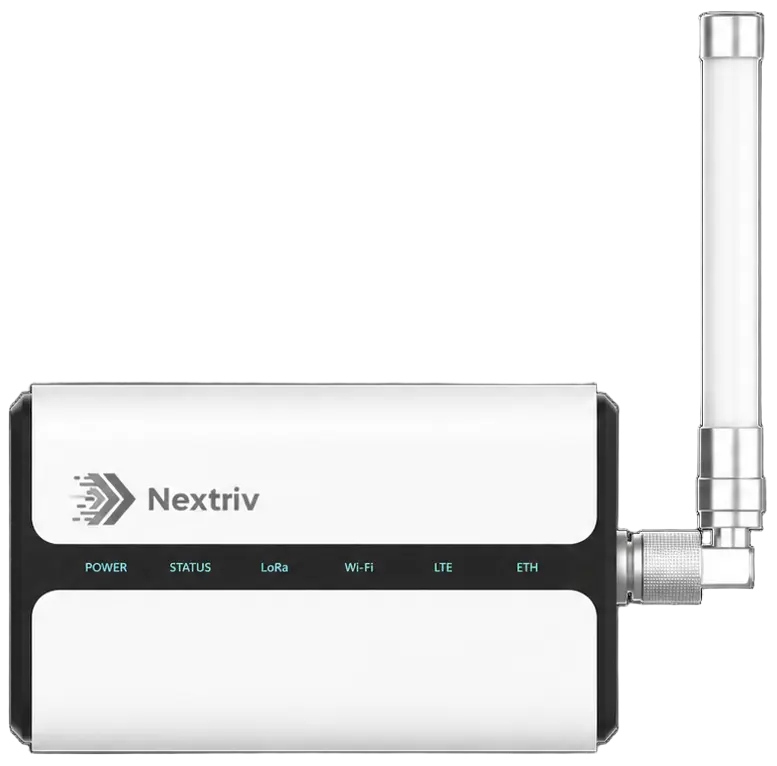
The arithmetic is on the side of the wireless architecture. NFC activation takes seconds per device, and detection (30–180 s) happens in the background and in parallel — you never wait for any single sensor. Installation without chiselling walls or pulling cables takes a few minutes per point: a hundred points for two people fits into a few hours with margin for a break. And a gateway of the Nextriv Hub Pro class handles around 2,000 devices — a hundred sensors uses a fraction of its capacity, so network throughput is not a worry on deployment day or during expansion. Power over a single PoE cable, operation from −40 to +70 °C and an IP65 rating let you hang it in an unheated part of the facility too, and the external antenna connector stretches coverage to the grounds around the building.
The traps that wreck the schedule
From experience — the five things that most often turn one day into three weeks:
- No power at the gateway location. The only deployment element that depends on other people. A PoE port agreed a week in advance is half the battle.
- Activating on a ladder instead of at a table. Every configuration task done at height takes three times as long and tends to get skipped "because it's cold".
- Names "for later". Later never comes. A sensor without its name from the sheet is a future incident nobody will be able to locate.
- Thresholds "we'll set after a week of data". An approximate threshold today beats a perfect one never — values get corrected after the first season, but protection has to work from the first night.
- Skipping the alarm test. A system whose notification path nobody has walked end to end gets tested by the first real failure — which is too late.
Two topics deliberately left outside deployment day: battery management (the platform reports battery levels, and real-world operating times are covered in our article on sensor battery life) and measurement calibration wherever quality documentation requires it — the calibration register with reminders is discussed in the piece on temperature sensor calibration.
Day two and beyond
After the deployment, a rhythm remains: a weekly glance at the trends, threshold corrections after the first weeks of data, a PDF report for the people who never log in to the platform. If you want to rehearse the playbook at small scale, the free plan includes 10 sensors, a gateway and a year of measurement history — a one-department pilot before deciding on the hundred. Plan details are in the pricing, and if you would rather see the full path first — from sensor discovery to alarm escalation — book a demo: we will walk it live in half an hour.


