
Environmental sensors in a server rack — a mounting guide
Rack sensor mounting done right: where exactly to hang it, how to measure air intake and exhaust, drill-free installation and alarm thresholds — step by step.
Zespół Nextriv4 min read

In this article
- What to measure at the rack: the intake, not "somewhere in the room"
- A sensor in a server rack: the exact mounting spots
- Drill-free mounting: tape, cable ties and NFC configuration
- Connectivity from deep inside the building
- Names and the dashboard: order from day one
- Thresholds, and what a rack sensor won't see
- From the box to working supervision in one afternoon
A sensor in a server rack gets mounted once for years to come — which is exactly why it's worth doing right the first time. A badly placed sensor doesn't lie outright: it shows a true temperature, just not the one that destroys hardware. A reading above the air conditioner reassures, a reading in the hot aisle alarms, and the temperature that actually matters — at the servers' air intake — remains unknown. This guide walks through the whole installation: what to measure, at which points on the rack, how to attach the sensor without drilling, and what thresholds to set so supervision works from the very first night.
What to measure at the rack: the intake, not "somewhere in the room"
A server draws cool air in at the front and pushes hot air out at the back — which is why the only temperature hardware vendors guarantee is the one at the intake. Differences between the cold and hot aisles run to a dozen or more degrees, and overheating starts locally, with a single rack; we covered this in more depth in the article on server room temperature monitoring. From this follows a simple hierarchy of measurements:
- rack intake (front) — the mandatory measurement; it's what the ASHRAE recommendations (18–27 °C) and any SLAs apply to,
- rack exhaust (rear) — an extra measurement where you want to see the temperature rise across the rack; a growing delta at constant load betrays an airflow problem before the intake so much as twitches,
- humidity — measured along the way by the same sensor: too dry invites static, too humid risks condensation on cool surfaces.
A sensor in a server rack: the exact mounting spots
The overriding rule: the sensor measures the air about to enter the servers, so it hangs on the front of the rack, in the stream the hardware is drawing in.
- Mid-height on the front is a sensible minimum for a single rack.
- Three points — bottom, middle, top — on densely populated racks: heat stratifies vertically and the upper section can run several degrees warmer than the bottom. One mid-mounted sensor averages the problem away; three reveal it.
- The rack rear — one point near the top, if you're measuring delta T.
- A room reference sensor — away from air supplies and doors, as background for interpretation; it's worth adding a point in the switchgear room too.
What to avoid: the direct stream from a perforated floor tile (reads several degrees low), the vicinity of power strips and PSUs (reads high), the area by doors opened on every technician visit (false spikes).

Drill-free mounting: tape, cable ties and NFC configuration
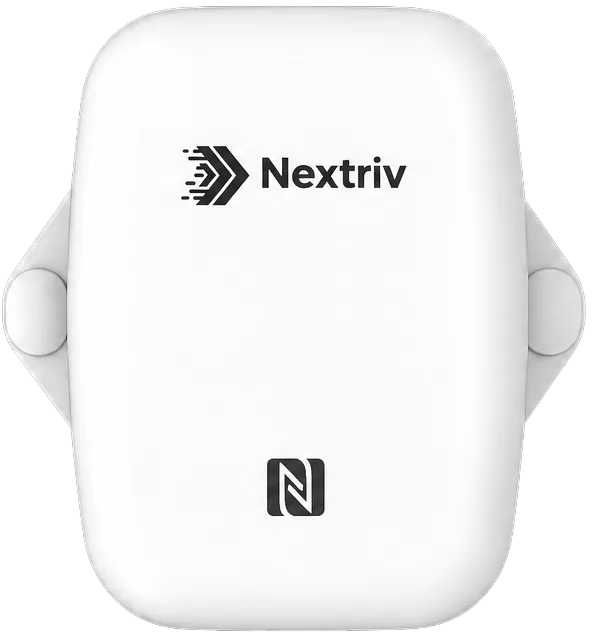
Nobody in a server room wants to drill into rack doors — and nobody has to. The battery-powered temperature and humidity sensor Nextriv Sense Essential ships with three mounting options: double-sided 3M tape (perforated doors, side panels), cable ties (vertical rails, cable organisers) and screws when the measurement point is a wall. The whole thing weighs under 100 grams, so tape is entirely sufficient.
Configuration happens contactlessly via NFC from a phone — no opening the enclosure and no service cables, so commissioning a dozen-odd units comes down to holding a phone against each one. The ±0.3 °C accuracy matters in practice: with an 18–27 °C band the alarm threshold genuinely guards the value you typed in, and the 0.1 °C resolution makes slow trends visible. A local buffer of around 2800 measurements with automatic retransmission fills the data back in after any connectivity gap, and the sealed IP67 enclosure — overkill in an air-conditioned room — lets the same model also cover a service pit, a rooftop air intake or the switchgear room.

Connectivity from deep inside the building
Server rooms tend to sit in basements, behind reinforced concrete and steel doors — which is why, instead of Wi-Fi, Nextriv sensors transmit over long-range radio, with a link budget designed for approx. 2 km in built-up areas and approx. 15 km in open terrain. In practice a floor slab or two walls are no obstacle, and the gateway can sit a floor up, somewhere with good coverage. After mounting, leave the installation alone for a day and check that reports come in regularly; from then on the platform keeps watch — a sensor with no transmission for twice its reporting interval is flagged offline with a notification, a gateway after 15 minutes of silence. Missing data is an alarm too.
Names and the dashboard: order from day one
With three racks sensor names feel like a formality; with thirty they are the foundation. A convention worth adopting straight away: room, row, rack, measurement point — "DC1-R2-S07-front-top" says everything without opening the documentation, including to the person who picks up the alarm two years from now. The readings come together on a dashboard with nearly 20 widget types: a sensor table shows all the intakes at a glance, a multi-series chart overlays points from a whole row, and sensor comparison puts the front and rear of the same rack side by side — that is, delta T over time. A quarter of an hour spent on the dashboard pays for itself at the first "which rack has been heating up since yesterday?".
Thresholds, and what a rack sensor won't see
Each metric carries four thresholds — warning and critical, on both sides of the range. A sensible start for the intake: a warning above 27 °C, the critical threshold a few degrees higher, and the lower thresholds standing guard against overcooling, which costs energy. Set the humidity thresholds wide — they are meant to catch a precision cooling failure, not daily weather swings. Notifications go out on the channel your team actually uses — email, SMS, web push, Microsoft Teams, Discord or an in-app audible alarm — and escalation policies pass an unacknowledged alarm upward, which at three in the morning makes all the difference.
Honestly: a sensor on the rack won't see everything. Water under the raised floor needs separate detection — we described it in the guide to leak detection under the raised floor — and an open rack door or presence in the room is a job for contact and motion sensors. The good news: the same platform and the same alert rules tie it all together.
From the box to working supervision in one afternoon
A few racks, a reference sensor and the switchgear room fit comfortably in the free plan: 10 sensors, a gateway and a full year of measurement history — no cabling, no BMS integration, tape mounting and phone configuration. The wider picture of server room supervision — from hot spots to evidence for colocation customers — is in the data center solution. Check the pricing or book a demo — we'll show live what an alarm with escalation looks like before you set one up yourself.


